How to Size an Order with Risk Amount
The Risk Amount feature calculates an estimated order volume from your Stop Loss distance and the amount of account balance you want to risk. It supports market and pending orders.
Risk Amount is a position-sizing tool. It does not create a separate risk rule and does not guarantee the final loss of an executed trade.
Requirements
Risk Amount is available only when:
- The Advanced order section is open.
- Stop Loss is enabled.
- A valid Stop Loss price is available.
- The platform has the symbol specification, current or pending entry price, account balance, and required currency conversion rate.
When Stop Loss is disabled, Risk Amount is also disabled. Enabling Stop Loss enables Risk Amount automatically, but you can turn Risk Amount off manually.
How to use Risk Amount
1. Open the order panel and expand Advanced.
2. Enable Stop Loss and enter a valid SL price.
3. Keep Risk Amount enabled.
4. Choose an input mode:
- Percent: Enter the percentage of the account Balance you want to risk.
- Value: Enter a fixed risk value in the account currency.
5. Enter a value greater than zero.
6. Review the automatically calculated Volume and the estimated loss shown below the inputs before placing the order.
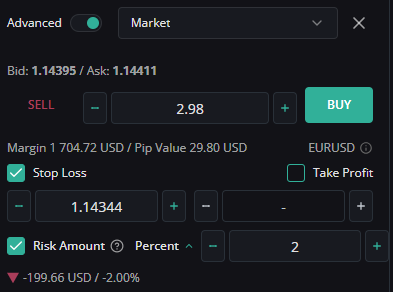
Percent mode uses Balance
Percent mode calculates the risk value from the account Balance, not Equity:
Risk value = Risk percent / 100 × Account Balance
Floating profit or loss therefore does not increase or decrease the base used by this calculation.
Example: if the account Balance is 10,000 USD and the selected risk is 2%, the target risk value is 200 USD.
Value mode uses the account currency
Value mode treats the entered number as an amount in the account currency. For example:
- A USD account interprets
200as 200 USD. - A EUR account interprets
200as 200 EUR.
When the symbol's profit currency differs from the account currency, WebTrade converts the risk value using the available bid or ask conversion rate before calculating volume.
Entry price and Stop Loss distance
The calculation uses the applicable entry price for the selected order type:
- Market BUY: Current Ask price.
- Market SELL: Current Bid price.
- Limit or Stop pending order: Pending order price.
- Stop Limit pending order: Trigger price.
The Stop Loss must be on the loss side of the entry price:
- BUY: SL must be below the entry price.
- SELL: SL must be above the entry price.
If the SL direction is invalid or the distance is zero, WebTrade cannot calculate a new volume.
Important: If WebTrade cannot complete a new calculation, the existing Volume value may remain visible. Do not assume that this value matches the latest SL or risk input. Correct the SL and confirm that Volume and estimated loss update before submitting the order.
How volume is calculated
The simplified calculation is:
Raw volume = Risk value in profit currency / (SL price distance × Contract size)
WebTrade then adjusts the raw result to the symbol's trading specification:
1. Volume is rounded down to the nearest valid volume step.
2. A result above the symbol maximum is limited to the maximum volume.
3. A result below the symbol minimum is raised to the minimum volume.
If the calculated result is raised to the symbol minimum, the estimated loss may be higher than the risk value you selected. Always check the estimated loss after Volume reaches a symbol limit.
The Volume field is recalculated when relevant inputs change, including the risk value, risk mode, SL price, entry price, order side, symbol, or current market price used by a market order.
Simplified example
Assume all of the following:
- Account Balance: 10,000 USD.
- Risk mode: Percent.
- Risk: 2%, equal to a target risk value of 200 USD.
- BUY entry price: 1.10000.
- SL price: 1.09900.
- Contract size: 100,000.
- Account currency and symbol profit currency require no conversion for this simplified example.
The SL distance is:
1.10000 - 1.09900 = 0.00100
The raw volume is:
200 / (0.00100 × 100,000) = 2.00 lots
The final Volume remains 2.00 lots only if it complies with the symbol's minimum, maximum, and volume-step settings.
What happens when the SL price changes?
For the same target risk:
- Moving SL farther from the entry increases the loss distance, so calculated volume decreases.
- Moving SL closer to the entry decreases the loss distance, so calculated volume increases.
- If the result reaches a symbol minimum or maximum, volume cannot continue adjusting beyond that limit.
Why estimated loss may differ from the selected risk
The displayed and final loss can differ from the selected risk because:
- Volume is rounded to the permitted volume step.
- Volume is clamped to the symbol's minimum or maximum.
- Currency conversion rates can change.
- A market order can execute at a different price because of spread or slippage.
- Trading costs such as commission, swap, or other fees are not part of the simplified sizing formula.
- A position may close at a different price during gaps or fast market conditions.
Always review the calculated Volume, SL price, and estimated loss before submitting the order.