Available Trader's Guard Commitments
Trader's Guard delivers an institutional-grade risk management architecture modeled after professional proprietary trading firms (Prop Firms). It empowers you to establish automated, binding commitments that protect your capital against emotional decision-making, overtrading, and tilt.
Why Trader's Guard Exists (Prop Firm Risk Architecture & Trader Psychology)
Professional trading performance is rarely ruined by market unpredictability; it is almost always ruined by lack of emotional discipline. Trader's Guard provides automated safeguards designed to solve the most destructive trading behaviors:
- Eliminating "Revenge Trading": Experiencing consecutive losses often triggers a dangerous emotional state ("tilt"), leading traders to recklessly increase position sizes to recover losses. Rules such as Consecutive Loss and Daily Loss Limits automatically trigger cooldown locks, forcing you to step away and regain composure.
- Preventing "Overtrading": Restricting maximum daily orders and concurrent positions keeps you focused on high-probability setups rather than trading out of boredom or market noise.
- Capital Preservation & Drawdown Ceilings: Absolute equity floors and floating drawdown controls ensure you can never lose more than your predetermined daily risk tolerance.
- The 7-Day Commitment Lock (Client Agreement Section 30.4): When you activate a Trader's Guard Scenario, it is subject to a minimum commitment period of seven (7) days. During this period, you cannot weaken, shorten, or delete rules. This deliberate design protects your long-term trading plan from short-term emotional impulses.
[!NOTE] Operational Scope & Execution Reality (Risk Disclosure Statement Section 13): * Pre-Order Checks (Block Order): Applied to orders submitted via the GreatBless platform before they are routed to MT5. * Post-Order Checks (Account Lock & Close Order): Continuously monitor active positions and apply to all trades on the account. * Best-Effort Safeguard: Automated liquidations are executed at the best available market price. In conditions of extreme volatility, liquidity gaps, or weekend price jumps, execution prices may experience slippage beyond your configured rule thresholds. Trader's Guard is a discipline tool, not an absolute guarantee of zero capital loss.
Comprehensive Guide to Available Commitments
1. Auto SL/TP Protection
This rule applies the saved Default SL/TP and optional SL to Entry settings to every new WebTrade order.
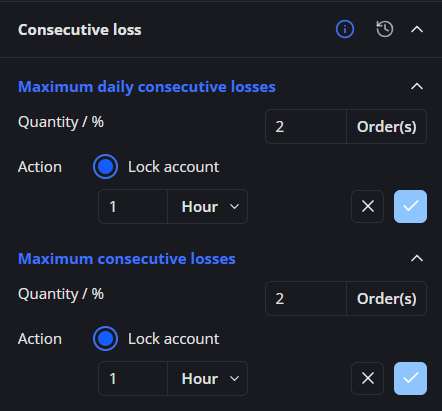
2. Consecutive Loss
- Maximum daily consecutive loss:
- Orders counted: Only fully closed orders.
- Net result: P/L + commission + fee + swap.
- Losing order: A net result below 0 increases the daily consecutive-loss counter.
- Violation: Occurs when the counter exceeds the configured maximum.
- Counter reset: Resets when the net result is greater than or equal to 0, or at the start of a new trading day.
- Example: The configured maximum is 2 consecutive losing orders.
- Order 1: P/L of −16 USD, commission of −2 USD, fee of −1 USD, and swap of −1 USD. The net result is −20 USD, so the counter becomes 1.
- Order 2: P/L of −6 USD, commission of −2 USD, fee of −1 USD, and swap of −1 USD. The net result is −10 USD, so the counter becomes 2. This is still within the configured maximum.
- Order 3: The net result is −5 USD, so the counter becomes 3. This exceeds the configured maximum of 2 and triggers a violation.
- If a fully closed order has a net result of 0 or higher before the third consecutive loss, the counter resets to 0.
- The counter also resets to 0 at 00:00 on the next MT5 Server day.
- Maximum consecutive losses:
- Orders counted: Only fully closed orders.
- Net result: P/L + commission + fee + swap.
- Losing order: A net result below 0 increases the consecutive-loss counter.
- Violation: Occurs when the counter exceeds the configured maximum.
- Counter reset: Resets only when the net result is greater than or equal to 0. It does not reset at the start of a new trading day.
- Example (MT5 Server time, UTC+2): The configured maximum is 2 consecutive losing orders.
- At 23:00 on 2025-07-01, Order 1 is fully closed with a net result of −20 USD, so the counter becomes 1.
- At 00:00 on 2025-07-02, the counter remains 1 because this rule does not reset at the start of a new trading day.
- At 09:00 on 2025-07-02, Order 2 is fully closed with a net result of −10 USD, so the counter becomes 2. This is still within the configured maximum.
- At 10:00 on 2025-07-02, Order 3 is fully closed with a net result of −5 USD, so the counter becomes 3. This exceeds the configured maximum of 2 and triggers a violation.
- If a fully closed order has a net result of 0 or higher before the third consecutive loss, the counter resets to 0.
3. Loss cool-down
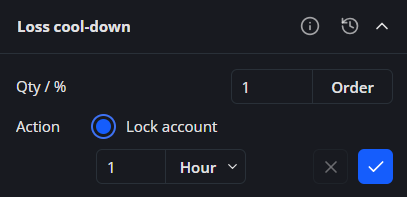
- After loss: If a fully closed order has a negative net result, calculated as P/L + commission + fee + swap, the system will lock the account for the number of hours selected by the trader. The loss count is fixed at 1.
- Example (MT5 Server time, UTC+2):
- The lock duration is set to 1 hour. The loss count remains fixed at 1.
- At 14:00 on 2025-07-01, an order is fully closed with a P/L of −16 USD, commission of −2 USD, fee of −1 USD, and swap of −1 USD.
- The net result is −16 − 2 − 1 − 1 = −20 USD. Because the net result is negative, the loss cool-down is triggered.
- The account is locked from 14:00 until 15:00. During this period, new orders cannot be placed.
- At 15:00, the 1-hour cool-down ends and the account is unlocked.
- A fully closed order with a net result of 0 or higher does not trigger the loss cool-down.
- Example (MT5 Server time, UTC+2):
4. Max order limit
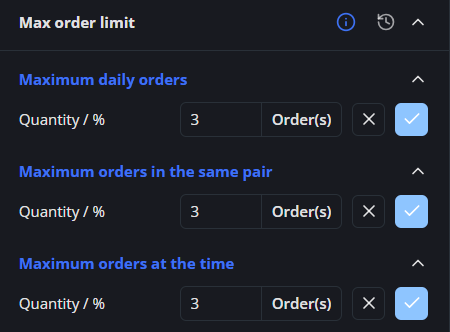
- Maximum daily orders: The maximum number of orders that can be created during one MT5 Server day, from 00:00 to 23:59:59. The counter includes each position opened and each pending order placed that day, even if the position is later closed or the pending order is later canceled or expires. Rejected orders are not counted, and a pending order that is filled is not counted twice. The counter resets at 00:00 on the next MT5 Server day.
- Example: The limit is set to 3. During the day, you open 2 positions and place 1 pending order, so the counter is 3. A total of 3 is still within the limit and does not trigger a violation. When you place the fourth order, the counter becomes 4, exceeds the limit, and the system will display a violation notification. The counter starts again from 0 at 00:00 on the next MT5 Server day.
- Maximum orders in the same pair: Limits the total number of open positions and active pending orders you can have at the same time for one trading pair.
- Example: The limit is set to 3. For EURUSD, you have 1 open BUY position, 1 open SELL position, and 1 active pending order. Each open position is counted separately, regardless of whether it is a BUY or SELL. For example, 2 BUY positions count as 2 orders, just as 1 BUY position and 1 SELL position also count as 2 orders. In this example, the total for EURUSD is 3, which is still within the limit and does not trigger a violation. Placing a fourth EURUSD order increases the total to 4, exceeds the limit, and the system will display a violation notification.
- Maximum orders at the time: Limits the total number of open positions and active pending orders allowed at the same time across the entire account, regardless of trading pair. Each open position and active pending order counts as one. A closed position or a canceled or expired pending order is no longer counted. When a pending order is filled, it continues to count as the resulting open position and is not counted twice.
- Example: The limit is set to 3. You have 1 open EURUSD position, 1 open XAUUSD position, and 1 active GBPUSD pending order, so the total is 3. This is still within the limit. Placing another market order or pending order on any trading pair would increase the total to 4, exceed the limit, and trigger a violation notification. If one position is closed or the pending order is canceled, the total decreases and another order can be placed.
5. Volume management
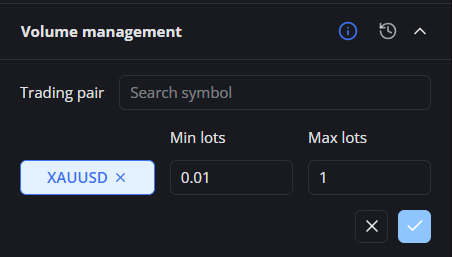
This rule sets the minimum and maximum lot size allowed for each individual order on the selected trading pair. It applies to both market orders and pending orders.- Trading pair: Select the trading pair to which the volume limits will apply.
- Min lots: The minimum lot size allowed for a single order.
- Max lots: The maximum lot size allowed for a single order.
- How it is checked: Each order is checked separately. The system does not add together the volumes of multiple orders.
- Example: For XAUUSD, Min lots is set to 0.01 and Max lots is set to 1.00. An order of 0.01, 0.50, or 1.00 lots is allowed. An order below 0.01 or above 1.00 lots exceeds the allowed range, and the system will display a violation notification.
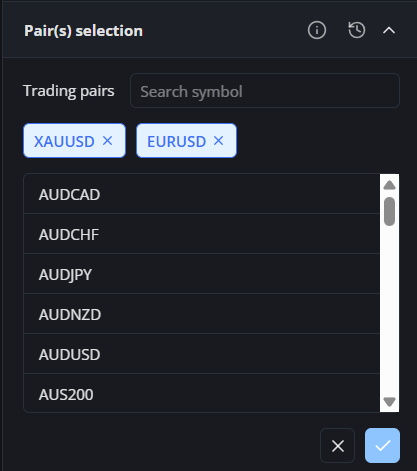
6. Pair(s) selection
This rule lets you choose how the selected trading pairs are handled. It applies to both market orders and pending orders.- Allow trading: Only the selected trading pairs can be traded. Orders for pairs that are not selected will be blocked.
- Example: XAUUSD and EURUSD are selected in Allow trading mode. You can place orders for XAUUSD and EURUSD. An attempt to place a GBPUSD order will be blocked and trigger a violation notification because GBPUSD is not included in the allowed list.
- Block trading: The selected trading pairs cannot be traded. Pairs that are not selected remain available for trading.
- Example: XAUUSD and GBPUSD are selected in Block trading mode. An attempt to place an XAUUSD or GBPUSD order will be blocked and trigger a violation notification. You can still place an EURUSD order because EURUSD is not included in the blocked list.
- Selection required: Select at least one trading pair before confirming the rule.
- Existing orders: Open positions and pending orders created before the rule is activated are not treated as violations. The rule applies only to new orders created after activation.
- Violation: An attempt to trade a restricted pair will trigger a violation notification, and the system will prevent the order from being placed through the GreatBless platform.
7. Market direction
Candle Direction
Candle Direction allows a new order only when its BUY or SELL side matches the direction derived from the most recently closed reference candles. It applies only to the trading pairs selected in the rule.- Reference mode: Choose Weekly + daily, Weekly, or Daily. Weekly + daily permits only the direction shared by both closed candles. If one candle is neutral, the other candle determines the permitted direction; if the two directional candles conflict, both BUY and SELL are blocked.
- H1 confirmation: When enabled, the last closed H1 candle must also support the direction permitted by the main reference mode. H1 can confirm or narrow the result, but it cannot reverse the weekly or daily direction. H1 confirmation is enabled by default for newly configured rules.
- Candle classification: The Guard recognizes bullish and bearish hammer shapes before using the candle body. Otherwise, a candle with Close above Open permits BUY and a candle with Close below Open permits SELL.
- Neutral candle (Doji): A neutral candle does not block both sides and does not override another timeframe. With a single neutral reference, both BUY and SELL remain available; when combined with a directional candle, the directional candle decides.
- Orders covered: The direction check covers market orders and all BUY/SELL pending-order types. A pending order that becomes contrary to a new daily or weekly direction may be cancelled automatically when the reference period changes.
- Missing candle data: The current WebTrade configuration uses an allow policy when reference candle data is temporarily unavailable. The order is not blocked by this rule until the required data becomes available.
- Final verification: WebTrade displays the current direction and disables an unavailable side, while the Backend verifies the rule again when the order is submitted.
MA Direction
MA Direction permits trading only after the live market price has moved the configured distance away from a moving average calculated from closed candles.- Reference timeframe: Select one timeframe: H1, D1, or W1.
- Moving-average settings: H1 supports SMA or EMA periods from 2 to 200. D1 supports SMA periods from 2 to 200 and EMA periods from 2 to 52. W1 supports SMA periods from 2 to 94.
- Distance: Enter the minimum distance in points. For example, 100 points equals 10 pips on a five-digit FX symbol and 1.00 on XAUUSD when its point size is 0.01.
- BUY condition: BUY is permitted when the current Ask is at or above
MA + configured distance. - SELL condition: SELL is permitted when the current Bid is at or below
MA - configured distance. - Inside the MA band: If price is between the BUY and SELL boundaries, neither direction is permitted.
- Orders and symbols covered: The rule covers market orders and all BUY/SELL pending-order types, but only for the trading pairs selected in the rule.
- Keep the chart available: Open and keep the selected symbol's chart available in WebTrade so the Guard can receive its live price. If the chart subscription, live tick, candle history, or MA value is unavailable, both directions are blocked until the required data is restored.
- Final verification: WebTrade updates the available side from live prices, while the Backend recalculates and verifies the rule when the order is submitted. A price move between display and submission can therefore change the final result.
8. Equity management
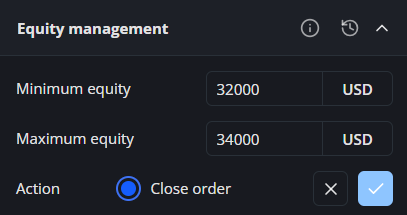
This rule keeps the account equity within the configured minimum and maximum limits.- Minimum equity: The lowest account equity allowed. A violation occurs when the account equity falls below this limit.
- Maximum equity: The highest account equity allowed. A violation occurs when the account equity rises above this limit.
- Action: If either limit is exceeded, the system will display a violation notification, close all open positions, and cancel all active pending orders.
- Example: If the minimum equity is set to 32,000 USD and the maximum equity is set to 34,000 USD, an account equity between 32,000 and 34,000 USD is allowed. An account equity below 32,000 USD or above 34,000 USD will trigger a violation.
9. Loss management
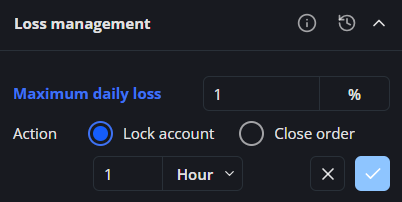
This rule limits how much the account Equity can decrease from its opening daily baseline. At the start of the cycle, the system records both Balance and Equity and uses the higher value. The daily reference resets at 00:00 on the next MT5 Server day.- Maximum daily loss: The maximum percentage by which the account equity is allowed to decrease during one MT5 Server day.
- Violation: A violation occurs when the daily loss exceeds the configured percentage. The system will then apply the violation action you selected.
- Calculation:
Opening baseline = max(Start-of-cycle Balance, Start-of-cycle Equity). Deposits increase this baseline and withdrawals reduce it so that funding is not treated as trading profit or loss. - Example: The start-of-cycle Balance is 100,000 USD, Equity is 99,000 USD, and maximum daily loss is set to 1%. The opening baseline is 100,000 USD, so the account already has a 1% daily loss from its floating loss. Under this configurable rule, an Equity below 99,000 USD will trigger a violation; 99,000 USD is still within the limit because this rule triggers only when the configured percentage is exceeded.
10. Equity drawdown
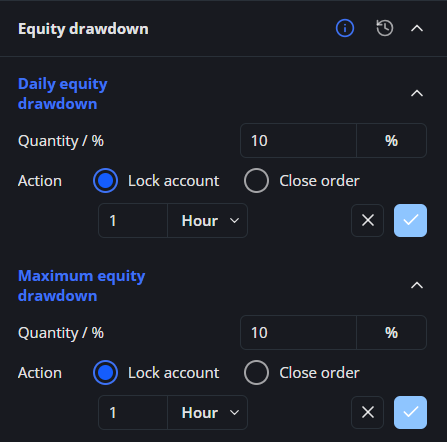
This rule limits how far the account equity can fall from its highest recorded level.- Daily equity drawdown: The maximum percentage that the account equity is allowed to fall from the highest equity reached during the current MT5 Server day. The highest-equity reference resets at 00:00 on the next MT5 Server day.
- Example (MT5 Server time, UTC+2):
- At 12:00 on 2025-07-01, the account equity is 1,000 USD.
- You activate the rule with a daily equity drawdown limit of 10%. The current equity of 1,000 USD becomes the initial equity peak.
- This first daily tracking period runs until 23:59 on 2025-07-01. The rule remains active after this period, but the daily equity peak resets for the next MT5 Server day.
- At 15:00 on 2025-07-01, the equity falls to 990 USD. The daily equity drawdown is (1,000 − 990) / 1,000 × 100 = 1%.
- At 17:00 on 2025-07-01, the equity rises to 1,100 USD. This becomes the new equity peak.
- At 21:00 on 2025-07-01, the equity falls to 990 USD. The daily equity drawdown is (1,100 − 990) / 1,100 × 100 = 10%. This is exactly the configured limit and does not trigger a violation.
- At 22:00 on 2025-07-01, the equity falls to 989 USD. The daily equity drawdown is approximately 10.09%, which exceeds the 10% limit. The selected violation action is applied.
- At 00:00 on 2025-07-02, the daily equity peak resets, and the system begins tracking the highest equity for the new MT5 Server day.
- Example (MT5 Server time, UTC+2):
- Maximum equity drawdown: The maximum percentage that the account equity is allowed to fall from the highest equity reached since the rule was activated. The highest-equity reference does not reset at the start of a new trading day.
- Example (MT5 Server time, UTC+2):
- At 12:00 on 2025-07-01, the account equity is 1,000 USD.
- You activate the rule with a maximum equity drawdown limit of 10%. The current equity of 1,000 USD becomes the initial equity peak.
- At 15:00 on 2025-07-01, the equity falls to 990 USD. The maximum equity drawdown is (1,000 − 990) / 1,000 × 100 = 1%.
- At 17:00 on 2025-07-01, the equity rises to 1,100 USD. This becomes the new equity peak.
- At 23:00 on 2025-07-01, the equity falls to 1,000 USD. The maximum equity drawdown is approximately 9.09%.
- At 00:00 on 2025-07-02, the equity peak does not reset. The system continues using 1,100 USD as the highest equity reached since the rule was activated.
- At 09:00 on 2025-07-02, the equity falls to 990 USD. The maximum equity drawdown is (1,100 − 990) / 1,100 × 100 = 10%. This is exactly the configured limit and does not trigger a violation.
- At 10:00 on 2025-07-02, the equity falls to 989 USD. The maximum equity drawdown is approximately 10.09%, which exceeds the 10% limit. The selected violation action is applied.
- Example (MT5 Server time, UTC+2):
- Violation: A violation occurs when the account equity falls below the calculated equity threshold. The system will then apply the violation action you selected.
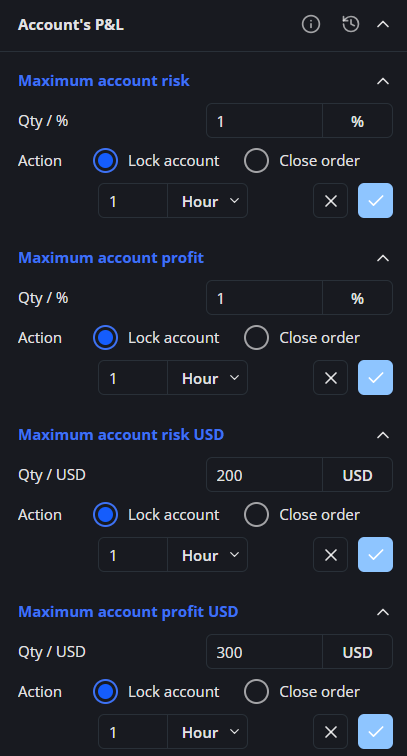
11. Account's P&L
This rule monitors the floating results of all open positions on the account. The net result of each position is calculated as P/L + commission + fee + swap. Losing and profitable positions are totaled separately.- Maximum account risk: The maximum combined floating loss of all losing open positions, calculated as a percentage of the account balance recorded when the rule is activated.
- Maximum account profit: The maximum combined floating profit of all profitable open positions, calculated as a percentage of the account balance recorded when the rule is activated.
- Maximum account risk USD: The maximum combined floating loss of all losing open positions, using a fixed USD limit.
- Maximum account profit USD: The maximum combined floating profit of all profitable open positions, using a fixed USD limit.
- Violation: A violation occurs when the applicable floating loss or profit exceeds the configured limit. The system will then apply the violation action you selected.
- Maximum account risk example:
- At 12:00 on 2025-07-01, the rule is activated while the account balance is 100,000 USD. Maximum account risk is set to 1%, so the account risk limit is 1,000 USD.
- On 2025-07-02, the account has three open positions:
- Position 1: P/L of −550 USD, commission of −30 USD, fee of −10 USD, and swap of −10 USD. The net floating result is −600 USD.
- Position 2: P/L of −470 USD, commission of −20 USD, fee of −5 USD, and swap of −5 USD. The net floating result is −500 USD.
- Position 3: P/L of +320 USD, commission of −10 USD, fee of −5 USD, and swap of −5 USD. The net floating result is +300 USD.
- Combined floating loss: 600 + 500 = 1,100 USD. The profitable position is tracked separately and does not offset the losing positions.
- Account risk: (1,100 / 100,000) × 100 = 1.1%.
- The account risk of 1.1% exceeds the configured 1% limit, so a violation is triggered and the selected violation action is applied.
Note: Percentage-based Account P&L limits are calculated using the account balance recorded when the rule is activated.
12. Trading session
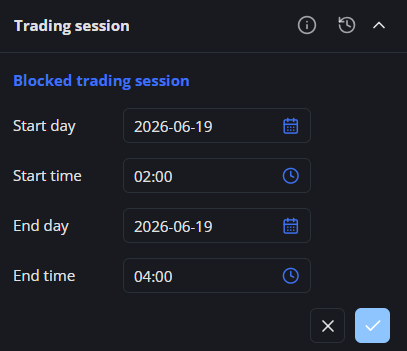
This rule blocks new trading during a specific future time range. All dates and times use MT5 Server time and apply to both market orders and pending orders.- Blocked trading session: Set the period during which new trading is not allowed.
- Start day / Start time: The date and time when the blocked period begins. The start time is included in the blocked period.
- End day / End time: The date and time when the blocked period ends. Trading is allowed again at the end time.
- Violation: An attempt to place an order during the blocked period will be blocked and trigger a violation notification.
- Example: The Start day is set to 2026-06-19 at 02:00, and the End day is set to 2026-06-19 at 04:00. An order placed at 03:00 will be blocked. Trading is allowed again from 04:00.
13. Economic calendar
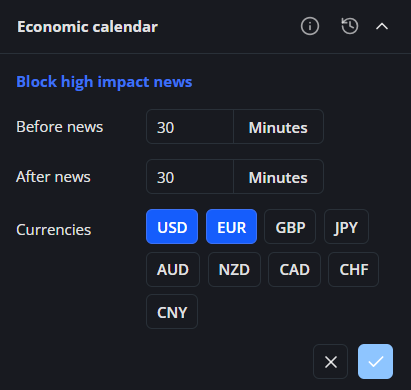
This rule blocks new trading around high-impact economic news events. The blocking window uses MT5 Server time and applies to both market orders and pending orders.- Block high-impact news: Prevent new trading around economic news events classified as High impact.
- Before news: Set how many minutes before the news release trading will be blocked. The allowed range is 6 to 30 minutes.
- After news: Set how many minutes after the news release trading will remain blocked. The allowed range is 6 to 30 minutes.
- Currency: Select the currencies to monitor. The rule applies when the selected currency is included in the trading pair. If no currency is selected, the system automatically uses the currencies contained in the trading pair.
- Violation: An attempt to place an order during the blocked news window will be blocked and trigger a violation notification.
- Example: Before news and After news are both set to 30 minutes, with USD and EUR selected. If a high-impact USD news event is scheduled for 15:30, an EURUSD order placed during the blocking window from 15:00 to 16:00 will be blocked.
14. Floating drawdown
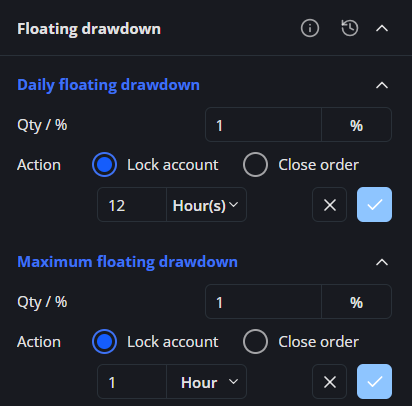
This rule measures the percentage decrease in the lower of the account balance and equity from its highest recorded value.- Calculation:
- Current floating value (a): a = min(balance, equity).
- Peak floating value (b): b = max(a, previous peak floating value).
- Floating drawdown: (b − a) / b × 100.
- Daily floating drawdown: The maximum percentage that the current floating value is allowed to fall from its highest value recorded during the current MT5 Server day. The peak floating value resets at 00:00 on the next MT5 Server day.
- Example (MT5 Server time, UTC+2):
- At 12:00 on 2025-04-20, the account balance and equity are both 1,000 USD.
- You activate the rule with a daily floating drawdown limit of 10%. The current floating value is a = min(1,000, 1,000) = 1,000 USD. This becomes the initial peak floating value, so b = 1,000 USD and the floating drawdown is 0%.
- This first daily tracking period runs until 23:59 on 2025-04-20. The rule remains active after this period, but the peak floating value resets for the next MT5 Server day.
- At 15:00 on 2025-04-20, the balance remains 1,000 USD and the equity falls to 900 USD. The current floating value is a = min(1,000, 900) = 900 USD, while b remains 1,000 USD.
- The daily floating drawdown is (1,000 − 900) / 1,000 × 100 = 10%. This is exactly the configured limit and does not trigger a violation.
- At 16:00 on 2025-04-20, the equity falls to 899 USD while the balance remains 1,000 USD. The daily floating drawdown becomes (1,000 − 899) / 1,000 × 100 = 10.1%, which exceeds the 10% limit. The selected violation action is applied.
- At 00:00 on 2025-04-21, the peak floating value resets, and the system begins tracking the highest floating value for the new MT5 Server day.
- Example (MT5 Server time, UTC+2):
- Maximum floating drawdown: The maximum percentage that the current floating value is allowed to fall from its highest value recorded since the rule was activated. The peak floating value does not reset at the start of a new trading day.
- Example (MT5 Server time, UTC+2):
- At 12:00 on 2025-04-20, the account balance and equity are both 1,000 USD.
- You activate the rule with a maximum floating drawdown limit of 10%. The current floating value is a = min(1,000, 1,000) = 1,000 USD. This becomes the initial peak floating value, so b = 1,000 USD and the floating drawdown is 0%.
- At 17:00 on 2025-04-20, both the balance and equity rise to 1,100 USD. The current floating value becomes a = min(1,100, 1,100) = 1,100 USD, so the new peak floating value is b = 1,100 USD.
- At 23:00 on 2025-04-20, the balance remains 1,100 USD and the equity falls to 1,000 USD. The maximum floating drawdown is (1,100 − 1,000) / 1,100 × 100 ≈ 9.09%.
- At 00:00 on 2025-04-21, the peak floating value does not reset. The system continues using 1,100 USD as the highest floating value recorded since the rule was activated.
- At 09:00 on 2025-04-21, the balance remains 1,100 USD and the equity falls to 990 USD. The current floating value is a = min(1,100, 990) = 990 USD, while b remains 1,100 USD. The maximum floating drawdown is (1,100 − 990) / 1,100 × 100 = 10%. This is exactly the configured limit and does not trigger a violation.
- At 10:00 on 2025-04-21, the equity falls to 989 USD. The maximum floating drawdown becomes (1,100 − 989) / 1,100 × 100 ≈ 10.09%, which exceeds the 10% limit. The selected violation action is applied.
- Example (MT5 Server time, UTC+2):
- Violation: A violation occurs when the floating drawdown exceeds the configured limit. The system will then apply the violation action you selected.
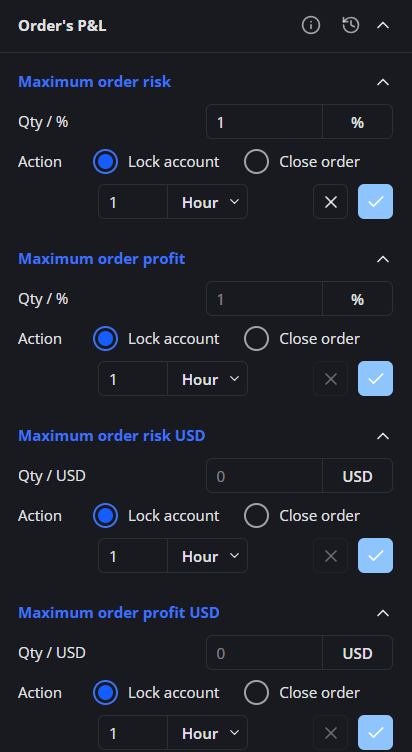
15. Order's P&L
This rule monitors each open position separately. The net floating result of each position is calculated as P/L + commission + fee + swap. Results from different positions are not combined.- Maximum order risk: The maximum net floating loss allowed for one open position, calculated as a percentage of the account balance recorded when the rule is activated.
- Maximum order profit: The maximum net floating profit allowed for one open position, calculated as a percentage of the account balance recorded when the rule is activated.
- Maximum order risk USD: The maximum net floating loss allowed for one open position, using a fixed USD limit.
- Maximum order profit USD: The maximum net floating profit allowed for one open position, using a fixed USD limit.
- Violation: A violation occurs when the net floating loss or profit of any individual open position exceeds the configured limit. The system will then apply the violation action you selected.
- Maximum order risk example:
- At 12:00 on 2025-07-01, the rule is activated while the account balance is 1,000 USD. Maximum order risk is set to 5%, so the risk limit for each open position is 50 USD.
- You open two positions and hold them overnight.
- On 2025-07-02:
- Position 1: P/L of −40 USD, commission of −3 USD, fee of −2 USD, and swap of −5 USD. The net floating result is −50 USD, so the order risk is (50 / 1,000) × 100 = 5%. This is exactly the configured limit and does not trigger a violation.
- Position 2: P/L of −52 USD, commission of −3 USD, fee of −2 USD, and swap of −3 USD. The net floating result is −60 USD, so the order risk is (60 / 1,000) × 100 = 6%. This exceeds the 5% limit, so a violation is triggered and the selected violation action is applied.
- Each position is evaluated separately. The combined loss of 110 USD is not used to calculate Maximum order risk.
Note: Percentage-based Order P&L limits are calculated using the account balance recorded when the rule is activated.
Scope: Commitments whose action is Block order check the order before it is placed, and apply to orders submitted through the GreatBless platform. Commitments whose action is Lock account or Close order act after a position is opened, so they apply to every position on the account. See Violation Action Types.