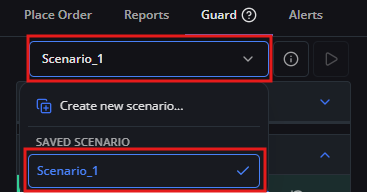
Applying a Saved Scenario
When applying a Scenario to a live account, you must select an effective duration between 7 and 90 days (default: 7 days). Once applied, the commitment is locked for this duration and cannot be unlocked, canceled, or relaxed early. This feature is purposely engineered to safeguard traders against emotional impulsivity and revenge trading.
Use this guide when you have configured one or more saved Scenarios and want to activate one on your current trading account. In this example, you will activate Scenario_1.
1. Click the [Guard] icon to open Trader's Guard.
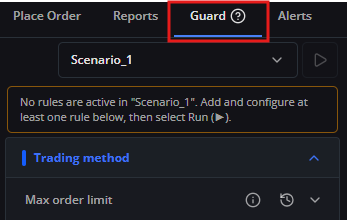
2. From the scenario selector, select [Scenario_1].
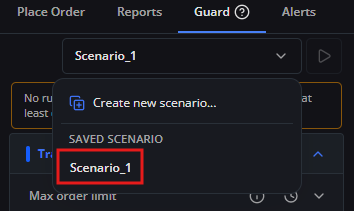
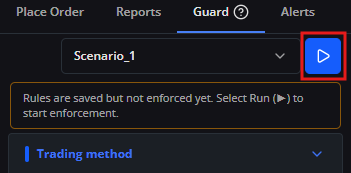
3. Run the selected Scenario using either method:
- Quick run: Click the [Play] icon directly on the Scenario row.
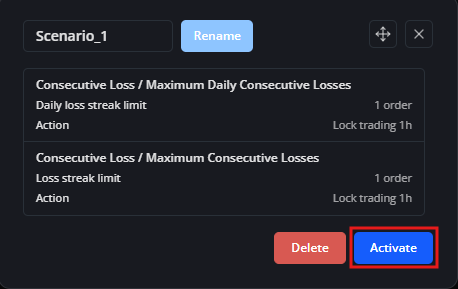
- Run from details: Open Scenario details, then click [Run].
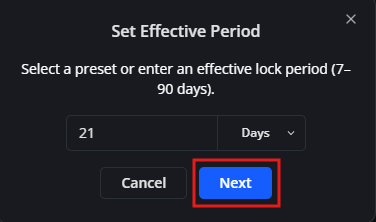
4. In the Set Effective Period dialog, enter the number of days, or choose a preset duration (7, 14, 30, 60, or 90 days).
5. Review the selected effective lock period, then click [Next].
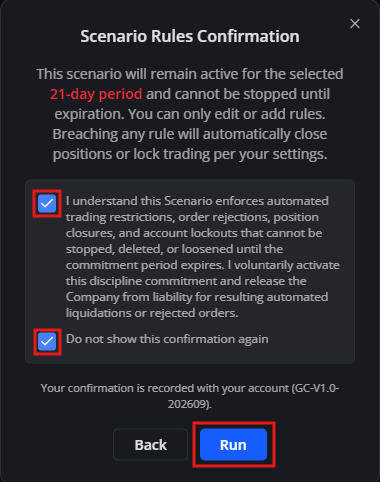
6. In the Scenario Rules Confirmation dialog, review the rules and commitment terms. Select the required checkbox to confirm that you understand the automated trading restrictions and accept the commitment. Optionally select Do not show this confirmation again, then click [Run].
Note: You only need to accept the Terms of Service the first time you run a Scenario. You do not need to accept them again when running subsequent Scenarios.
7. After confirmation, a green checkmark appears next to Scenario_1 in the scenario selector, indicating that the protection rules are active and continuously monitored on your account.