Backtest Replay Controls
The Replay toolbar is docked directly below the chart while Backtest mode is active. On smaller screens and mobile devices, the toolbar scrolls horizontally with smooth drag support.

What each control does
- Select bar : Pick your replay start candle by clicking directly on the chart.
- Select date : Open the UTC calendar and date-time picker to jump to a specific historical point.
- Time and timezone selector : Displays the exact M1 simulation time and UTC offset. Click it to switch the chart timezone.
- Current : Immediately pans the chart viewport back to the candle currently being replayed. Shortcut: Shift + C.
- History (mobile only) : Opens the dedicated Backtest History screen on mobile devices.
- Refresh : Clears your selected start point and returns the chart to the live present. Available after selecting a start point and before pressing Play.
- Play / Pause : Starts or pauses automatic candle progression. Pressing Play for the first time starts the simulation engine and unlocks Step and End. Shortcut: Shift + Space.
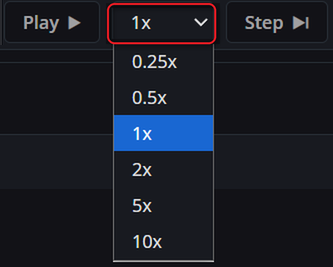
- Speed : Adjusts playback delay: 0.25x, 0.5x, 1x (the default), 2x, 5x, or 10x.
- Step : Advances by exactly one candle when paused, or skips the current candle's delay when playing. Unlocked once replay is running. Shortcut: Shift + → (can be held down).
- End : Fast-forwards through all remaining historical data to the final candle, settles remaining positions/orders, and completes the session. Unlocked once replay is running. Shortcut: Shift + End.
- Exit : Exits Backtest and returns to live trading. Prompts to save the session if the run is currently in progress.
Hover over any greyed-out button to view a tooltip explaining what action is needed to unlock it.
Changing the speed
Click the speed selector to choose how fast candles replay. The simulation evaluates 1-minute bars with precise per-step delays:
- 0.25x : 800ms per bar (slow, ideal for detailed multi-timeframe analysis).
- 0.5x : 400ms per bar.
- 1x : 200ms per bar (standard default speed).
- 2x : 100ms per bar.
- 5x : 50ms per bar.
- 10x : 20ms per bar (fast forward).
Changing the timezone
Click the time and timezone button on the toolbar to open the timezone selection menu:
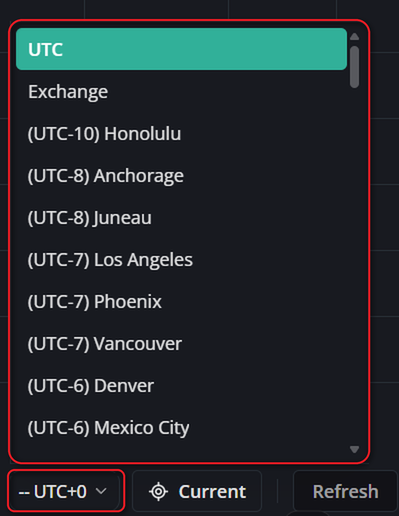
Changing the timezone updates the display formatting across the toolbar clock, order tables, History logs, and the Balance / Equity curve. It operates purely as a display preference and does not alter the underlying UTC order timestamps or disrupt the replay run.
The Backtest replay engine always processes data at the 1-minute candle level, regardless of the timeframe displayed on the chart. Because a D1 candle comprises 1,440 1-minute bars and a W1 candle comprises 10,080 bars, higher timeframe candles require processing many underlying minutes before forming a new bar. The toolbar clock continuously advances to confirm progress. To advance faster on higher timeframes, increase the Speed setting or press Step (Shift + →) to skip delay.
Keyboard shortcuts
- Shift + Space : Toggle Play / Pause.
- Shift + → : Step forward by one candle (holds down for continuous stepping).
- Shift + End : Fast-forward to the end and finish the session.
- Shift + C : Jump viewport to the Current simulation candle.
Shortcuts are automatically suppressed while your cursor is active inside any input field (such as the date, time, or speed inputs), preventing accidental triggers while typing.