Indicator Alerts in Backtest
Backtest has its own Indicator Alerts sandbox. You create alerts from the same Alerts tab you use in live trading, but they are evaluated against the replayed candles on the simulated clock and they exist only inside the run. Nothing is sent to the alerts service, no email or MT5 message is produced, and your live alerts are never modified.
This is the tool for answering "would my RSI alert have fired before that move?" on data that already happened.
What the sandbox supports
- Indicators: SMA, EMA and RSI.
- Indicator period: 2 to 500.
- Timeframes: M5, M15, M30 and H1.
- Sources: the OHLC values of the candle.
- Operators: greater than (
>), less than (<),crosses_aboveandcrosses_below. - Channel: in-app only. The channel selector is fixed because there is nothing to send to.
- Limit: up to 10 alerts in one run.
An alert whose condition falls outside this list cannot be evaluated in Backtest - that is also why some live alerts are left behind when you copy them in.
The Alerts tab shows the run's quota and how the sandbox works right under its title:
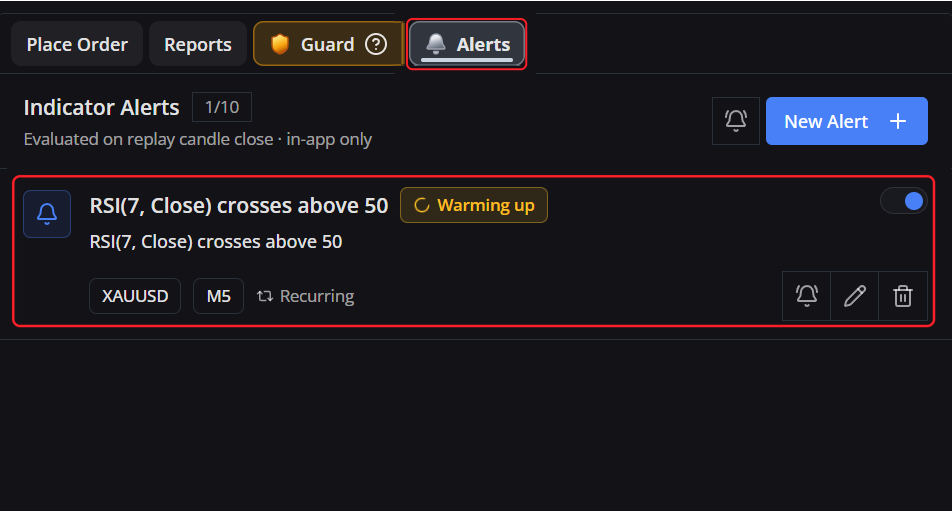
How alerts are evaluated
- Checked on candle close: Alerts are evaluated only when a candle of their configured timeframe closes on the replay clock. For example, an M15 alert checks once every 15 simulated minutes, regardless of the chart's current display timeframe.
- No false triggers: Panning, zooming, changing the chart timeframe, pressing Current, or clicking trade markers will never falsely re-trigger an alert.
- Level alerts (
>/<): Establish a baseline on the first candle and trigger on subsequent closed candles if the condition is met. The alert remains latched while true and automatically re-arms once the market pulls back across the threshold. - Cross alerts: Trigger when an indicator crosses above or below your target level between the previous closed candle and the current closed candle.
- One-time vs. Recurring: One-time alerts move to completed status after firing; recurring alerts continue monitoring future candles.
- Simulated expiry: Any alert expiration is measured against the simulation clock, not today's calendar date.
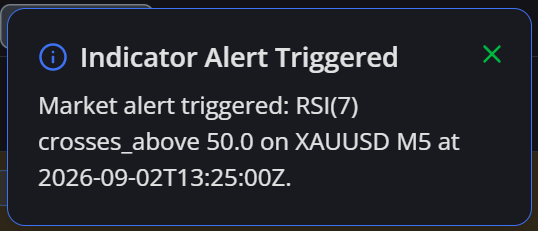
When an alert fires you get the same Indicator Alert Triggered toast as live trading and an entry in the alerts inbox, for example:
Market alert triggered: RSI(7) crosses_above 50.0 on XAUUSD M5 at 2026-09-14T05:15:00Z.
The timestamp is the close of the simulated candle in UTC - not the time on your computer.
Copying your live alerts into a run
When you enter Backtest with alerts to carry over, a dialog asks:
Copy live trading alerts? N alerts running on live trading match [symbol] and can be copied into this Backtest run. Copies follow the replay clock, notify in-app only and never change your live alerts.
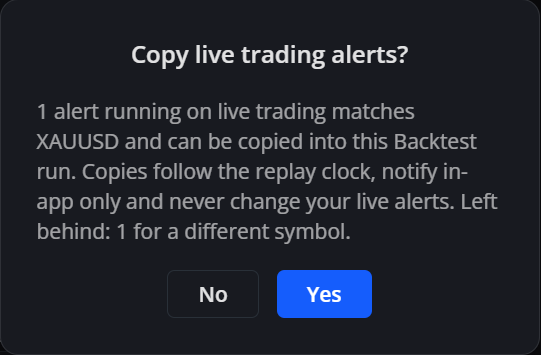
If some alerts cannot come along, the dialog says why, counted separately:
- For a different symbol: The alert watches a market you are not currently replaying.
- Unsupported condition: An indicator, timeframe, or operator outside the supported sandbox list.
- Symbol unavailable: The instrument is not in the run's symbol list.
- Alert limit reached: The 10-alert sandbox quota is already full.
Key rules regarding imported alerts:
- Symbol matching: Only alerts set for the currently replayed symbol are imported. An alert created for XAUUSD will not be placed on EURUSD. Alerts for other instruments stay safely in live trading.
- Expiry dates are dropped: Live alerts use real-world calendar dates. When copied into Backtest, calendar expiration is removed so the alert remains active throughout your historical test.
If the live alert list cannot be fetched, no question is asked and the run starts clean. A failed request means "we do not know what live is running", and copying a possibly stale list is worse than starting empty.
The question is asked once per session. When you restore a saved session, the alerts stored in that session are used and the question is skipped - otherwise you would end up with two copies of everything. If a restore prompt is also waiting, it is answered first.
Alerts on a symbol you are not showing
A sandbox can hold an alert for a symbol the chart is not currently replaying - from a restored session, or because you created one by hand. That alert stays in warming up with no indicator history behind it, and starts evaluating properly only when you switch the chart to its symbol. It is never primed with the candles of the symbol you happen to be looking at, because that would produce a "ready" alert sitting on a meaningless baseline.
What resets, and when
- Choosing a new start point: your alert definitions are kept, but their runtime, baseline, trigger history and unread count are cleared and warmed up again on the new timeline.
- Changing symbol: the runtime resets so candles of two symbols are never mixed.
- A new Backtest session, or Exit: the whole sandbox is cleared.
- Save Backtest state: definitions, triggers, unread count and indicator runtime are saved with the session and come back on restore. A session saved before alerts existed simply restores with an empty sandbox.
With at least one active alert, the End button walks through every simulated minute instead of jumping ahead, so that no candle close is skipped and no alert is missed. With no active alert, End keeps its usual shortcut. Expect a longer fast-forward on long runs - this is the cost of a complete alert log.